October 15, 2020
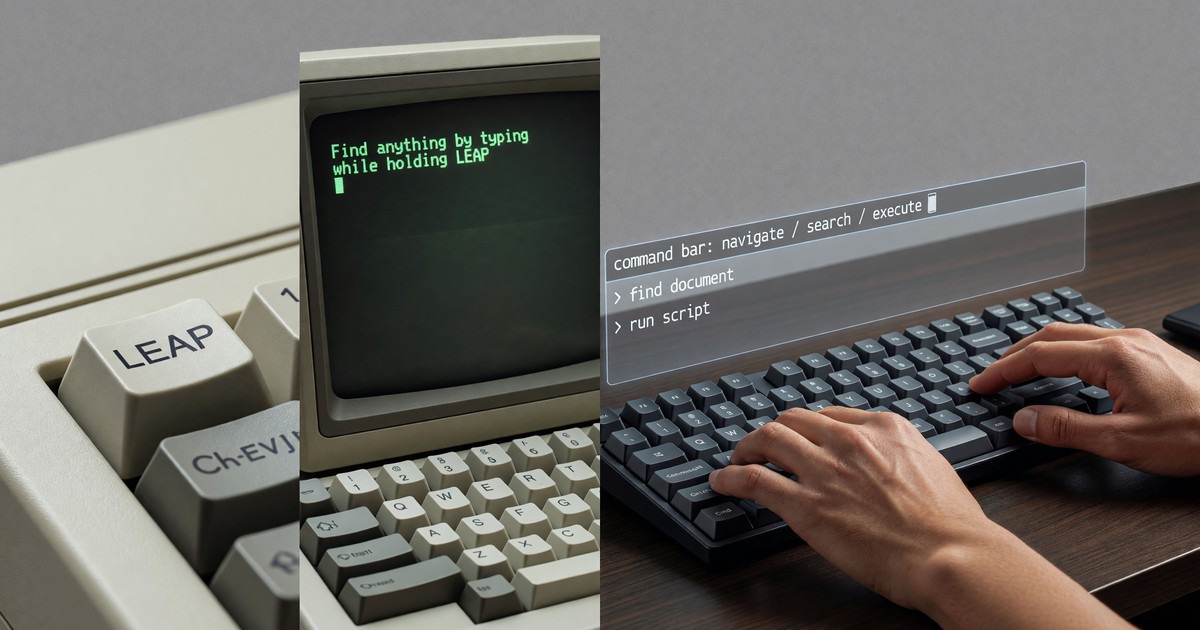
In 1987 Jef Raskin shipped a computer whose entire navigation model fit in a sentence: to find anything, you held a key and started typing, and the machine jumped to the nearest match. The computer was the Canon Cat, the key was LEAP, and the idea behind it has spent the intervening thirty-three years migrating, unattributed, into the most-used tools of professional software. The command bar that power users now reach for reflexively — the thing that opens when you press a keyboard shortcut and lets you type your way to any command or destination — is LEAP’s descendant, even though almost none of the people building command bars have heard the name.
This is RCHI’s recurring story: a Raskin idea, demonstrated decades early in hardware that did not survive, resurfacing in software that does not know where it came from. The command bar is the clearest current instance, and 2020 is a good vantage from which to take stock of it.
What LEAP Actually Did
It helps to be precise about LEAP, because it is easy to flatten it into “a search box,” which it was not. A search box is a separate place you go: you click into it, type a query, wait for a results list, choose an item, and return to your work. LEAP was not a place and not a mode. It was a quasimode — active only while you held the key. You held LEAP and typed, and the cursor moved to the nearest match in real time, character by character, with no results list to navigate. Release the key and you were there. The finding was the navigating; there was no intermediate selection step.
The other essential property was uniformity. LEAP worked the same way on everything in the machine — text in a document, a command, a piece of data. There was no separate mechanism for “find a word” and “run a command.” The interface contained one kind of thing, text, and one way to reach any of it. You learned the gesture once and it worked everywhere. That combination — a held-key quasimode, real-time movement, and total uniformity — is what made LEAP distinctive, and it is the part the modern command bar has recovered only partway.
The Command Bar’s Quiet Conquest
Watch a professional developer or a heavy software user work in 2020 and you will see the command bar everywhere, often as the primary means of getting around.
The clearest example is the command palette in Visual Studio Code, now the most widely used code editor among developers. Press a single shortcut and a bar appears; begin typing and it fuzzy-matches across every command the editor and its extensions expose, ranking results as you go. Experienced users navigate enormous functionality this way, bypassing menus entirely. Sublime Text and Atom popularized the pattern before VS Code carried it to dominance, but the lineage runs straight back through all of them to the idea LEAP demonstrated: type to act, no menu hunt required.
The same pattern shows up well beyond code editors. Slack’s quick-switcher lets you jump to any channel or person by typing a fragment of the name. Superhuman, the email client that has built much of its identity on keyboard-driven speed, is essentially a command bar wrapped around a mailbox — its whole pitch is that you type your intent rather than clicking through chrome. macOS launchers in the Spotlight and third-party tradition do the same for the system as a whole. In each case the interaction is recognizably LEAP-shaped: invoke a single input, type, and the system moves you to what you meant.
The striking thing is how completely this has become the marker of fluency. The command bar is how power users distinguish themselves from casual ones. Raskin would have found that bittersweet: the gesture he wanted to be the default navigation for everyone has become instead the secret handshake of the expert.
Where the Modern Command Bar Falls Short of LEAP
The command bar is LEAP’s heir, but it is a partial one, and naming the gaps is the useful part.
First, it is rarely a quasimode. Almost every command bar is a true mode: you invoke it, it takes over, you make a selection, and you dismiss it. LEAP was held, not toggled, and so could never be silently left open or forgotten. The modern bar reintroduces the very modal structure Raskin designed LEAP to avoid.
Second, it almost always returns a list. LEAP moved the cursor directly, with no list to read and choose from. The command palette, the quick-switcher, the launcher — all present ranked results that the user must scan and pick. The best implementations make the top result a confident default you can accept with a single keystroke, which narrows the gap, but the list is still there, and the extra selection step with it.
Third, and most important, it is not uniform. LEAP worked identically on everything in one system. The 2020 command bar is fragmented across applications: the VS Code palette finds VS Code commands, the Slack switcher finds Slack channels, the launcher finds applications and files. Each has its own scope, its own syntax, its own behavior. The single, universal gesture that reached anything in the machine has splintered into dozens of local gestures, each excellent within its own walls and useless outside them.
What RCHI Took From This
The Raskin Center built Archy precisely to recover what the splintered command bar gives up — an entire computing environment in which LEAP-style finding is the native, uniform navigation rather than a per-application feature bolted onto a menu-driven interface. Archy never reached mainstream users, and the command bar’s piecemeal triumph is, in a sense, the consolation prize: the industry adopted the gesture without adopting the architecture.
Still, the trajectory is unmistakable and it runs in Raskin’s direction. From menus, to search boxes, to per-app command bars, to the launchers that try to reach across the whole system — each step recovers a little more of what LEAP demonstrated in 1987. The destination, an interface where typing your intent is the universal and immediate way to navigate anything, is the one Raskin pointed at thirty-three years ago. The command bar is how far the rest of computing has walked toward it so far.
Part of the Raskin Center for Humane Interfaces documentation.
- Introduction to Archy — the full LEAP-based environment →
- Core Principles of Humane Interface Design →
- The Canon Cat manual →
External references: the Canon Cat and LEAP are documented in the Computer History Museum collections; the HCI literature on command-driven navigation is collected at the ACM Digital Library.