July 21, 2016
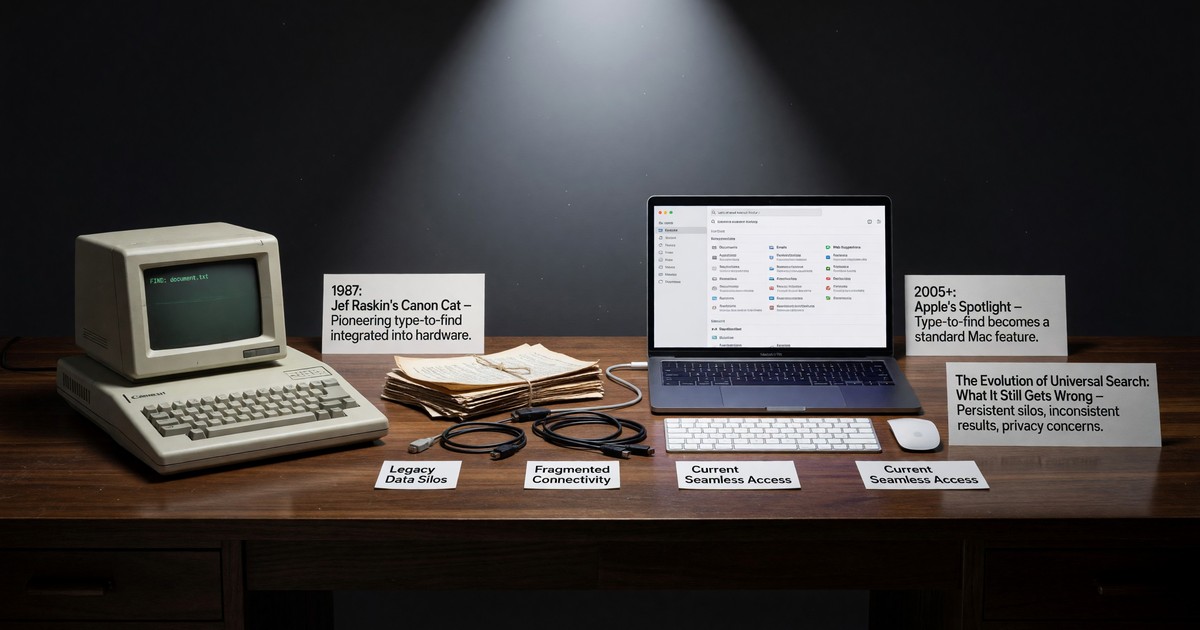
Press a key combination on any current Mac and a search box appears in the center of the screen. Begin typing, and the system offers matches drawn from across the machine: files, applications, contacts, mail, calendar events, dictionary definitions, even arithmetic. This is Spotlight, and for a sizable population of Mac users it has quietly become the primary way they launch applications and find documents. They no longer navigate to things. They type the name and press return.
Spotlight arrived in 2005 and has been refined steadily since. By 2016 it is mature, fast, and deeply woven into the operating system. It is also, in its core gesture, an idea that Jef Raskin shipped in 1987 — and that the broader industry took roughly two decades to rediscover and generalize. The history is worth tracing, because it shows both how a good idea propagates and how the version that wins is not always the version that was best designed.
The Cat Got There First
In 1987, the Canon Cat had no application launcher and no file browser, because it had no applications and no user-visible files. To go anywhere, you held the LEAP key and typed. The machine jumped to the nearest match as you typed, refining with each keystroke. Finding and navigating were the same act, and that act was typing. (The mechanism is preserved in the Canon Cat reference material, and its modern echoes are discussed in the piece on command palettes.)
This was universal search before the phrase existed. The Cat did not distinguish between searching a document, finding a command, and navigating to a location. It was all one keyboard-driven gesture across a single information space. Raskin considered this not a clever feature but the correct foundation for an interface — the thing that should replace menus, launchers, and hierarchies entirely.
The Long Gap
Between 1987 and the mid-2000s, mainstream computing went the other way. The Macintosh that Raskin had originated, and Windows after it, organized everything around files, folders, applications, and the mouse. To find something, you remembered where you had put it and navigated there by hand. To launch a program, you located its icon. Search, when it existed, was a slow, separate, opt-in tool — a dialog box you summoned to crawl the disk when you had genuinely lost something.
The shift began at the edges. Desktop search utilities appeared in the early 2000s, and web search had already trained an entire generation to expect that typing a few words would surface what they wanted. By the time Apple shipped Spotlight in 2005 and Microsoft built search into the Start menu, the cultural groundwork was laid: people had learned, through the web, that typing beats navigating. Bringing that expectation to the local machine was the obvious next step. It only looked obvious in retrospect.
What Spotlight Got Right
Spotlight’s genuine achievement is that it made type-to-find the default for a mass audience without requiring anyone to abandon the familiar desktop. It is additive. The folders are still there; the mouse still works; nothing was taken away. But for the users who adopt the keyboard gesture, the experience converges on something close to what the Cat offered: you stop navigating and start typing.
It is also fast and comprehensive in a way the early desktop-search tools were not. Indexing happens in the background; results appear as you type; the scope spans most of the machine’s content. For launching applications in particular, a large share of experienced Mac users have abandoned the Dock and the Applications folder entirely in favor of typing a few letters into Spotlight. That is the LEAP gesture, three decades late, on a hundred million machines.
What It Still Gets Wrong
The interesting part, from a Raskin perspective, is where Spotlight stops short. The Cat’s search was the interface — a single, modeless, always-available gesture that was the only way to navigate, and therefore consistent and predictable. Spotlight is one option layered onto an interface built on other principles. It coexists with menus, the Dock, Finder windows, and application-specific search boxes, each with its own behavior. The result is that “search” on a Mac is not one thing; it is a half-dozen overlapping things, and which one you get depends on context.
There is also the matter of scope and ranking. Spotlight decides what to surface and in what order, and that logic is opaque to the user. The Cat’s incremental search through a known body of text was transparent: you could see exactly why it landed where it did. Spotlight’s results are curated by heuristics the user neither controls nor fully understands, which occasionally means the thing you wanted is not the thing it offers first. Raskin’s standard — that the user should always be able to predict what the system will do — is not fully met.
These are not fatal criticisms. Spotlight is a substantial improvement over the navigate-by-hand era, and it has done more than any other single feature to vindicate Raskin’s bet that typing beats pointing for finding things. But it is a partial implementation of an idea that was once shipped whole. The Cat was a coherent interface built entirely on universal search. Spotlight is a powerful search feature inside an interface built on something else.
The Lesson
The history of Spotlight is a clean case study in how interface ideas actually travel. They are rarely adopted directly from their originators. Instead, the conditions that produced them recur — here, the problem of finding things in an ever-larger information space — and the same solution is reinvented, usually in a diluted form that fits the dominant paradigm rather than replacing it.
Raskin built the pure version and watched the industry decline it. Twenty years later, a diluted version became standard equipment. Both facts are true at once, and both are worth recording accurately.
Further Reading
- Command palettes rediscover the LEAP key — the same idea in programmers’ editors
- The Canon Cat reference manual — LEAP in the original
- Jef Raskin, Wikipedia
- Computer History Museum — primary materials on the Cat and its contemporaries
Part of the Ideas series — applying Raskin’s principles to current computing.